




Planning a trip often starts with a simple question: where can I find a flight, hotel, or rental car that fits my budget without opening a dozen tabs? I found Skyscanner useful for that first stage. It is a travel and local app from Skyscanner Ltd that brings several parts of trip planning into one search experience, while still leaving the final booking with the selected travel provider.
That distinction matters. I see Skyscanner mainly as a comparison and discovery tool rather than a complete travel agency in your pocket. It helps me explore routes, dates, accommodation and cars, but the handoff to another provider means I still need to check the final conditions carefully. For flexible travelers, that approach can save time. For someone who already knows the exact airline or hotel they want, using the provider’s own app may be more direct.
What using Skyscanner feels like in practice
The app covers flights, hotels and car rentals, so I can begin with one part of a trip and return later to consider the others. The interface is built around search rather than long-term travel management. I enter a destination or route, choose dates and travelers, then compare the available options. That sounds straightforward, but the quality of the result depends heavily on how carefully I enter the search.
One of the first places users can get stuck is the airport choice. A city may have more than one airport, and a result that looks cheap can become inconvenient when the airport is far from the place I actually need to reach. I always check the airport name, not just the city label, before treating a fare as useful. This is especially important for weekend trips, where a long transfer can erase the saving.
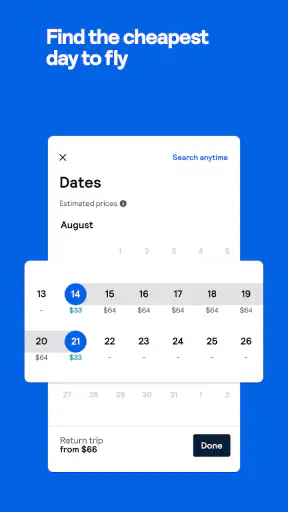
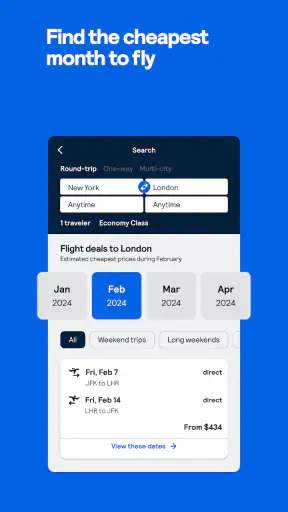
Date selection deserves the same attention. If my schedule is flexible, I do not search only one pair of dates. I compare nearby departures and returns and look at the total journey rather than focusing on the lowest number shown first. A cheaper flight with an awkward departure time, a long connection or a distant airport may be a poor bargain for a short break.
The app is free and available to an Everyone audience, which makes it easy to recommend for ordinary trip research. It has also attracted a 4.8 average from around 1.5 million ratings, with over 100 million installs. Those figures suggest that it is familiar to a very large travel audience, but popularity does not remove the need to inspect the details of a particular offer.
Where the setup can create confusion
Before searching, I make sure the destination spelling, travel dates and number of passengers are correct. A small mistake here can change the entire result set. I also check whether the search is for a one-way journey, a return trip or a multi-part itinerary, because the cheapest-looking option is not always the most practical combination.
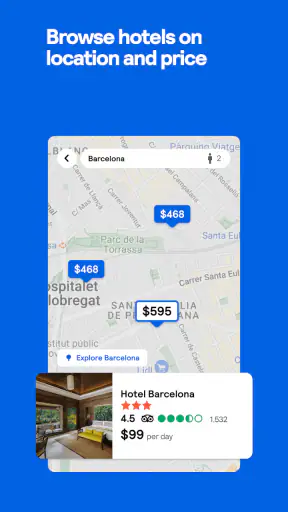
For hotels, I pay attention to the location on the map or in the property details rather than relying only on the neighborhood name. A hotel described as being in a popular area may still be a substantial walk or transit ride from the attraction I care about. I also read the booking conditions before moving forward, particularly around cancellation, payment timing and what is included in the displayed price.
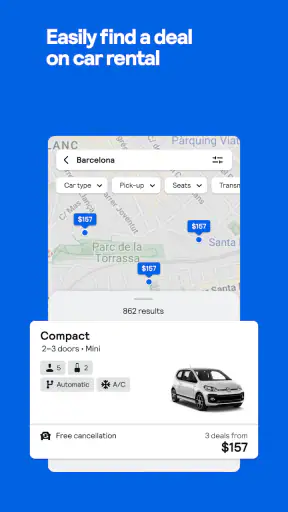
Car rental searches require a similar pause. I verify the pickup location, return location, dates and driver details. Airport desks and city-center desks can create very different practical experiences, even when the headline offer looks similar. I would not choose a car solely because its daily figure is low; I want to understand the collection point and the conditions attached to the reservation.
These checks are not unique to this app, but Skyscanner makes comparison quick enough that it is tempting to move too fast. The app’s strength is breadth, and breadth can also create decision fatigue. I find it works best when I decide my non-negotiables first: acceptable airports, maximum travel time, preferred location and whether flexibility matters more than the lowest price.
How I recover when a search goes wrong
When results look incomplete or unexpectedly expensive, I start by changing one search detail at a time. I check the dates, airport selection and traveler count before assuming the app is malfunctioning. Closing and reopening a search can also help me return to a clean starting point, but I avoid repeatedly changing everything at once because then I cannot tell which setting caused the difference.
If a result disappears after I select it, I treat that as a reason to recheck the offer rather than immediately blaming the application. Travel inventory changes, and the price or availability shown during comparison may no longer be available when the external provider opens. I compare the final page with the original search and make sure the route, dates, baggage choices and passenger details still match.
A useful recovery habit is to save the important details outside the search screen before continuing: flight numbers, hotel name, pickup address, cancellation deadline and the provider handling the reservation. That gives me something concrete to compare if the handoff looks different. It also prevents me from relying on memory after opening several similar options.
For flight searches, I check the baggage rules at the final provider as well as the summary shown during comparison. The cheapest fare may not suit a traveler who needs a checked bag or a particular seat. I also look at connection airports and the total duration. A low fare is less attractive when the itinerary introduces a difficult transfer or leaves little room for delays.
For hotels, I confirm the room type and occupancy after leaving the comparison screen. A property can have several room categories, and the first image or headline may not represent the room I am about to reserve. For cars, I confirm whether the selected vehicle is guaranteed or belongs to a broader category, then review the pickup instructions before paying.
When the problem is outside the app
Not every failed search, missing option or changed price originates in Skyscanner. The app connects travelers with offers from airlines, hotels, car rental companies and other booking providers. Once I am transferred to one of those services, the provider’s own systems and conditions become important.
If a payment fails after the handoff, I check which company is processing the transaction and whether I received a confirmation email or booking reference. I avoid trying to pay repeatedly until I know whether the first attempt succeeded. Duplicate attempts can create unnecessary confusion, so I first inspect my account, messages and the provider’s booking page.
If a reservation needs changing or cancelling, I contact the company named on the confirmation rather than assuming Skyscanner can alter the booking directly. The comparison app helped me find the option, but the booking provider normally controls the reservation’s terms. This is one of the most important practical differences between using a comparison service and booking directly with an airline or hotel.
Connectivity can also make results appear unreliable. A weak connection may leave a search loading, display stale information or interrupt the transition to another provider. I try the search again on a stable connection and check whether the issue affects one result or the whole app. If only one airline, hotel or rental company fails to open, the problem may be with that provider rather than the search itself.
Device compatibility is worth checking before installation. The current version is 7.205 and requires operating system version 10 or later. If the app cannot install or behaves strangely on an older device, updating the operating system where possible is a sensible first step. I would not assume that reinstalling alone will solve an incompatibility problem.
Small workflows that make comparison more useful
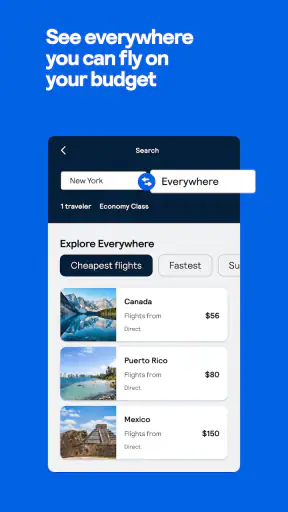
My preferred workflow begins with exploration, not immediate booking. I search a broad set of dates and airports, identify a few realistic options, then narrow them using journey length, departure time and final conditions. This prevents the cheapest headline result from dominating the decision before I have considered the trip as a whole.
For a flexible weekend, I compare the surrounding dates first and then return to the best combination with a more focused search. This is more useful than repeatedly refreshing one expensive date pair. It also helps reveal whether the saving comes from a genuinely better travel day or from an inconvenient itinerary.
For a family trip, I enter the correct passenger information before judging prices. A fare that works for one adult may not represent the same total when several travelers and baggage needs are included. I also compare the full route for everyone rather than selecting separate options too early, since splitting a group can create practical problems even when the numbers look attractive.
For a hotel stay, I use the app to build a shortlist, then inspect the provider’s final page before committing. My shortlist includes the location, room arrangement, cancellation terms and total price, not just the nightly figure. This two-stage method takes slightly longer but reduces the chance of choosing a property that looks good in search and fails my actual needs.
For car rentals, I treat the pickup and return plan as part of the price. If I am arriving by train, a city-center desk may be more convenient than an airport location. If I am landing late, opening hours and collection instructions matter more than a small difference in the displayed rate. The app is valuable for finding candidates, but the final decision needs local logistics.
Another useful habit is to compare the same itinerary directly with the airline, hotel or rental company before booking. Skyscanner can show me what exists across providers, while the direct site may offer a clearer loyalty benefit, a simpler change process or more complete information. I do not assume one route is always cheaper; I compare the final terms and support arrangements.
Who benefits most from this app
I think Skyscanner is strongest for travelers who are flexible and willing to compare. Someone planning a short city break can use it to test nearby airports and dates quickly. A traveler arranging a larger journey can use it to separate research into flights, accommodation and car hire rather than managing each search from scratch.
It is also useful for people who do not have a preferred provider. If I care more about reaching a destination at a reasonable overall cost than flying with one particular airline, a broad comparison can expose options I might not have considered. The same applies to hotels when I know the area and budget but not the property.
The app is less suitable for travelers who want every part of the booking handled in one place with one support team. The handoff between comparison results and external providers can feel less seamless than a direct booking. It is also not my first choice when I already have a loyalty program, a negotiated rate or a complex itinerary that needs specialist assistance.
People who dislike comparing conditions may find the number of choices tiring. The app can help narrow the field, but it cannot decide whether a lower fare is worth a longer journey or whether a cheaper room has acceptable cancellation terms. I would skip it if I wanted a single fixed recommendation and did not want to inspect the details behind it.
How it compares with booking directly
Booking directly with an airline, hotel or rental company is often simpler once I know exactly what I want. The provider’s own app may show its loyalty benefits, manage an existing reservation more clearly and keep customer support in one place. For a repeat trip with a familiar airline, direct booking can be the quickest route.
Skyscanner has the advantage earlier in the process. It gives me a wider view before I commit to one provider, which is particularly helpful when I am open to different airports, dates or companies. I use it as a research layer, then decide whether the final booking should happen through the provider shown in the result or through a direct channel.
Compared with manually opening many travel websites, the app reduces repetitive searching. Compared with a traditional travel agent, it gives me more control but less personalized guidance. That trade-off suits independent travelers who are comfortable checking terms themselves. It is less appealing when the trip involves unusual requirements, multiple changes or a high need for human assistance.
My practical verdict after using it
Skyscanner is a capable free travel comparison app, and its coverage of flights, hotels and car rentals makes it a useful starting point for ordinary trip planning. I especially value it when my dates or airport choices are flexible, because comparison is where the app saves the most effort.
Its main friction is not the basic search. It is the responsibility that comes after the search: checking airports, baggage, room conditions, pickup details, final prices and the identity of the booking provider. The app can surface an appealing option quickly, but I still need to slow down before paying.
Developed by Skyscanner Ltd, it has been available since Jul 20, 2011, and the current version is 7.205. I would recommend it to a friend who wants to explore realistic travel options without paying to install a planning tool. I would pair that recommendation with one clear rule: use the app for comparison, then verify the final booking with the provider that actually fulfills it.
That approach gives me the best balance. I get the broad search that makes flexible planning easier, while direct confirmation protects me from overlooking a baggage rule, cancellation condition or inconvenient pickup point. For simple trips, it can make the first step much faster. For complex or highly specific travel, a direct provider or specialist service may still be the better choice.


